Call Flow Builder
Launch voice apps instantly and engage callers — no coding required.
- 5 Minutes Building a fully functional call flow takes no more than 5 minutes, including external integrations.
- Unlimited Build as many call flows as you need, there is no limit on the number of call flows or operations.
- Full Access All functions are available to all users, no additional payments, no additional license - simple and clear.
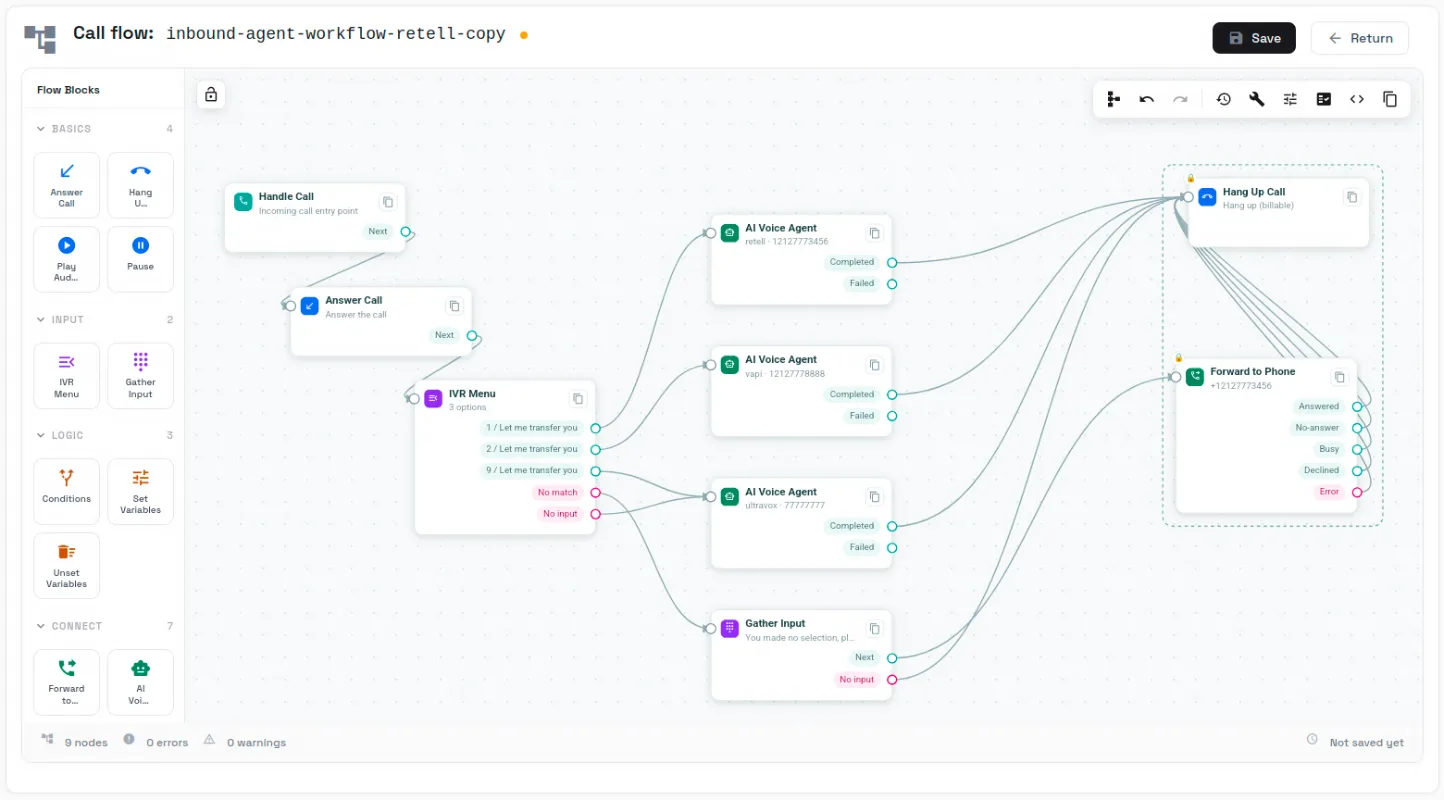
Drag-n-Drop Application building
The Cloudonix call flow builder enables any user to build various call flows, ranging from the simplest possible to the most complex. Integrating with external data sources, AI Voice agents, LLMs and more.
Easily Extendable
Leverage Cloudonix’s serverless Container Apps engine to craft your own JavaScript‑powered workflows and plug them into any call‑flow with zero hassle – speed, flexibility, instant deployment.
Unlock the full power of Cloudonix, no coding required. The Cloudonix Call Flow Builder empowers no-code teams to launch complete voice applications directly from the Cloudonix web app. Drag, drop, and connect modules to design intelligent call flows, triage and route agents, automate appointment reminders, and run customer surveys in minutes. From conversational IVR replacement to automated outbound campaigns, Cloudonix turns voice automation into your team's next competitive advantage.
Every account includes access to the Call Flow Builder, the developer portal and the community Discord, so help is always close. Schedule a one-hour hands-on training session with a Cloudonix solution engineer to get up to speed with the platform's full capabilities.
Frequently asked questions
What is the Cloudonix Call Flow Builder?
The Call Flow Builder is a no-code tool inside the Cloudonix web app that lets you design and launch voice applications by dragging, dropping, and connecting modules — no programming required.
Do I need coding experience to use the Call Flow Builder?
No. The builder is specifically designed for no-code teams, so you can create complete voice applications using a visual drag-and-drop interface.
What kinds of voice applications can I build with it?
You can design intelligent call flows, triage and route agents, automate appointment reminders, run customer surveys, replace legacy IVRs with conversational menus, and run automated outbound campaigns.
How long does it take to launch a voice app?
According to Cloudonix, teams can launch complete voice applications in minutes using the drag-and-drop modules.
Is the Call Flow Builder included with my Cloudonix account?
Yes. Every Cloudonix account includes access to the Call Flow Builder, along with the developer portal and the community Discord.
What support is available if I get stuck?
In addition to the developer portal and community Discord, you can schedule a one-hour hands-on training session with a Cloudonix solution engineer to learn the platform's full capabilities.
Where do I access the Call Flow Builder?
It lives directly inside the Cloudonix web app, so you can start building as soon as you log in to your account.